Zorphbert & Fred by Dawn Griffin

Aliens, disguised as dogs, making fun of .. well.. YOU.
  • Home
  • New Readers!
  • About Dawn
    • Watch Me Draw
  • Store
    • Shopping Cart
  • Archive
  • Contact

Fanart Friday: Company Man

May01
on 2009/05/01 at 12:00 am
Posted In: Fanart

companyman
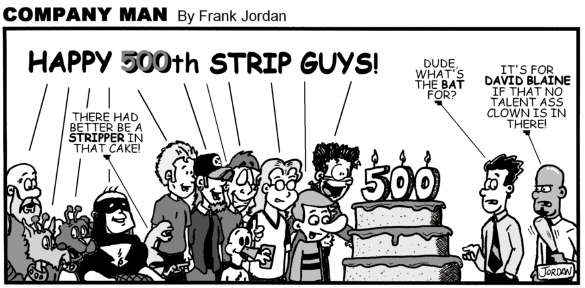
I was quite honored, maybe a year or so ago, to be apart of Company Man’s Big 500th comic update, with many other “drunk-duckers”. That’s right, 500 comics! Dude’s a work horse. But wait! That’s not all! He has now surpassed 700. That makes Mr. ToonmanAZ completely insane. Insane in a good way.

Company Man is your office comic combined with pop-culture references aplenty, and an overload of quotable punchlines and hilarious characters (like “Office Jason”). You simply must add this to your list of webcomics must-reads!

Check it out: Company Man by Frank Jordan

P.S. and he (finally) joined twitter! He’s a lot of fun to follow, go for it!

└ Tags: cake, company man, david blaine, Fanart, stripper
2 Comments

Fanart Friday: From 3 Doors Down

Apr24
on 2009/04/24 at 12:00 am
Posted In: Fanart

no images were found

(no, not the band “3 Doors Down”)

Fridays nights for me hold a tradition of getting together with a bunch of our neighbors and their kids. We have a blast: have a couple beers, watch a game or play some trivia game, the kids dance or play video games, and it’s a great way to wind down after a long work week. Well, this unexpected surprise came one Friday when my 10-year-old friend Meg whipped up what I call “The Ketchup Masterpiece” for me! She’s an avid reader of Z&F, part of my email list, and loves to make her own comics as well. She’s got the whole cast in this, right down to Fred’s sock-tail… amazing! Looks like they made quite the mess, next time someone better hide the ketchup …

Thanks Meg, it looks awesome! Keep it up!

└ Tags: Fanart, fred, ketchup, zorphbert
2 Comments

OMG, Check it out! (Y2cl)

Apr22
on 2009/04/22 at 12:00 am
Posted In: Blog

Review time! I am a proud member of the WebcomicPlanet Collective, and one of our projects to unite the crew and promote each other’s work is a Plug Circle. Excellent idea. First up, by Jhorsley3:

Okay, now… If you are a fan of my type of strip (family-friendly newspaper comic), this is a big jump. BIG jump. But jumping can be fun, no? Some of the best treasures are found off the beaten path, and they LIKE it there. They burrow a hole and stay put. In this case, this comic is for 18 and over, sorry kiddies.

Y2cl (stands for “Y2 Christ Light”) is an all-over-the-place webcomic. It started as a goofy comic so the author could make fun of his buddies, and developed into a menagerie of insanity: an eclectic cast of dudes being dudes, a ninja, a Zombie Jesus (and other varieties of Christ in all his.. uh… glory), photo-comics, spoofs, and a crazed violent rabbit named Larry (reminiscent of Donnie Darko’s creepy rabbit, eek). And that’s just summing it up. When you see that this comic has updated, you are never sure of what you’ll see when you click the link. “Predictable” can not be uttered in the same sentence as “y2cl”. Much unlike good ol’ loveable Z&F.

I’ll admit, I’m not 100% on board with every bizarre storyline, but Jhorsley3 comes up with some comedy gold most of the time. Who doesn’t love a sideways jab at Jesus himself., I mean he DID raise from the dead.. like a zombie. Well, maybe not loved by highly religious types, but I can get a kick out of Zombie Jesus devouring the cast of Rent, live & on stage. C’mon, that’s funny! I especially liked his Watchmen spoof, the Rorschach journal was hilarious.

Anyhoo, strap yourself into the Y2cl Coaster for one heck of a ride. Please keep all limbs & appendages inside the car at all times, or risk losing them to Zombie Jesus or a Crazed Bunny named Larry.

larry

Footnote: to see MY review, you can go HERE (and also check out a retro comic, circa.. hm.. 1977?)

└ Tags: http://y2clcomic.com/, review, webcomic, y2cl, zombie jesus, zombies
2 Comments

Fanart Friday!- Villain Next Door

Apr17
on 2009/04/17 at 2:46 pm
Posted In: Fanart

I think my wonderful fanart submitters need more exposure, so I’ll be doing “Fanart Friday”, every Friday (hopefully). Tune in for all the great pieces readers, fans and friends have created! Check out MORE goodies on my “Fanart, Cameos & More” page.

argonassistant trading cards

What a pleasant surprise it is to open your email and have a wicked cool piece of fanart to cheer you up! This one came in from my buddy Argon Assistant. And this guy’s supposed to be a VILLAIN’S Assistant. Well, I’ll tell you what A.A.– you won’t make a great villain going around and cheering people up, now will you? LOL

This cracks me up. Look how EVIL Fred looks, augh! I’ll have nightmares for weeks, seeing sweet old Fred (even complete with sock tail) looking downright possessed. But I LOVE it, thanks man!

Argon Assistant actually had a neat idea in mind, if I wanted to try another community project. This is what he had to say:

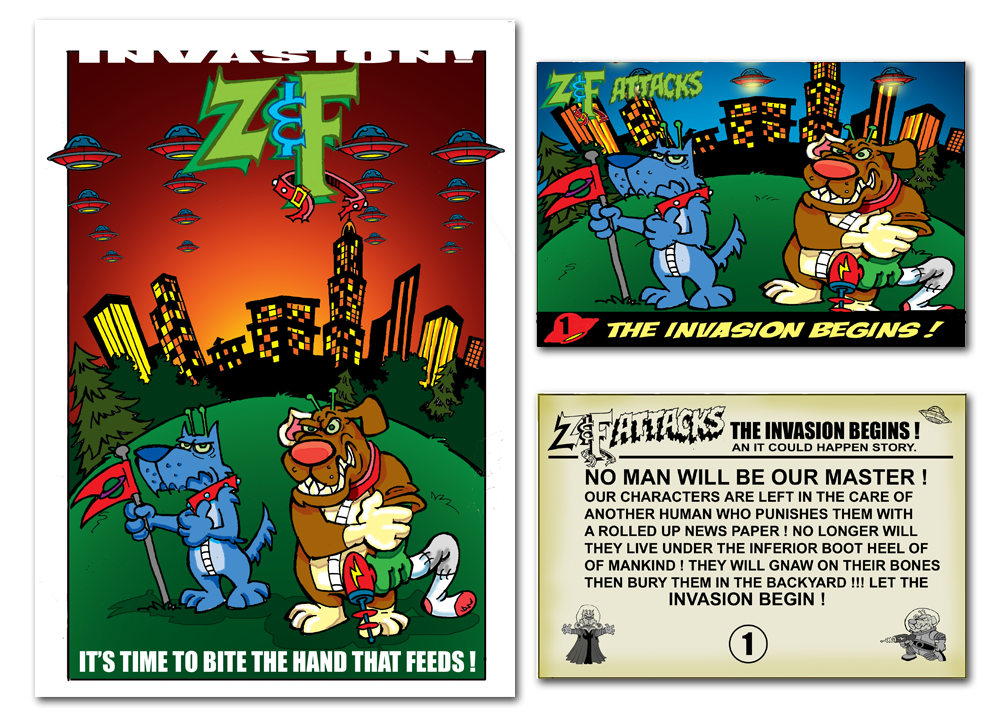
“the basic idea is that you have the fans sending you fan art make a story out of it. that story would be what if z&f decided to invade earth. here is the really cool part- you have the fans draw bubble gum cards that look like the old mars attacks cards.”

It is a pretty interesting idea… I’ll have to keep it in mind. What do you guys think?

Go check out a comic that puts the perfect spin on superhero comics: the bad guy’s point of view:

Villain Next Door

also, ArgonsAssistant does his own comic called Pawz to Clawz. If you like furry animals and goofy chaos, go check it out!

Pawz to Clawz

2 Comments

Tips & Tricks

Apr10
on 2009/04/10 at 12:00 am
Posted In: Tips & Tricks

I was thinking it’d be good to share some tips with my fellow webcartoonists. I’m often on UstreamTV, showing off my process as I work, and get a ton of questions. So, every week, I will either post a “Tips & Tricks” blog, or a “OMG, Check it out” blog where I do a semi-review of a comic I stumbled over online somewhere. It’ll be fun, trust me.

So, on to my first Tip/Trick. I primarily work in Illustrator (AI). I like the slick look of vector brushes, whereas Photoshop (PS) lineart can sometimes look jagged. I work 100% digitally (sketch, ink, color on the computer), and I would only suggest that if you have a Tablet PC like I do. However, whether you scan your sketch and ink with a wacom tablet in AI, or scan a fully inked comic to color digitally, this tip can work for you if you wanna attempt working in AI.

This is the set up steps I use after I finish the lineart and want to color my comic in. Line paint is a great tool.

Note #1: this tutorial is for version CS2, CS3 and 4 will have the same features, but may be in different places.
Note #2: if you are placing a PSD file you scanned with the lineart, skip to step 3.

Step 1. Backup

Duplicate your lineart onto another layer. Call this layer LINEART.
You want to keep your finished lineart as brush strokes on a separate layer in case you have to go back to it. Just hide this layer as backup.

Step 2. Rasterize!

On the LINEART layer, first draw blank box (no fill, no stroke) around the comic, as a border, where you’d want the edges of the file to be. This’ll make things easier, trust me. Make sure all other layers are locked. Select all. Go to OBJECT-> Rasterize. Depending on how big you work, you may have to go with 150 DPI, but 300 is preferable.

Step 3. Live Trace!

Your rasterized piece should look a tad … Well…. Rasterized. That’s fine. Select it, and look at the dock near the top, you should see LIVE TRACE. First, try clicking the main LIVE TRACE button, and see how your piece looks. If you don’t like the way it turned out, you can try different settings with the arrow to the right of the Live Trace button. You can create your own setting too, which I ended up doing. You’ll need to play around with customizing it.

Step 4. Expand

Once satisfied with the piece, make sure to hit the EXPAND button at the top. You’ll see how all your brush strokes have merged and now you have just white shapes and black shapes. This is the key to easy coloring!

Step 5. Prepare your layers

First, ungroup the traced piece. Add another layer called COLOR. Copy the white shapes from the LINEART later to the COLOR later, and delete the white from the LINEART layer. An easy way to do this is selecting one white shape, and go to SELECT->SAME->Fill Color. Then, just copy-paste! Paste-in-place will ensure everything remains in the exact same area. Now you should have separate layers with just black, and a layer with just white. This sounds racist, but you get the point, LOL.

Step 6. COLOR, baby!

Lock all layers but your COLOR layer. Select all (everything should be white). Select the Live Paint tool from the tools palette. It looks like a bucket with an asterisk. Mouseover an area you want to drop in color, and you should see red lines.. click and POOF! It’s filled! Just point and click and select different colors as need. A very easy way to add flat colors. Tip: go to VIEW-> Hide Edges to make those annoying red lines go away, it’s easier to see what you’re doing. You can then go in with the knife tool, and separate areas where you want to add shadows, or just draw them in with your wacom pen.

a note on backgrounds: you can delete shapes from your COLOR layer, and add another layer behind everything to use for backgrounds. I’ll typically add gradients, or some pre-made simple background settings.

It seems long, but honestly it takes me maybe 2 minutes to set this up. Good luck! Happy Comicing!

Click below to see a video of this process:
(after I recorded it, I realized you can barely hear me… but regardless it should help you see the steps above in action!)

Live Paint/Live Trace Tutorial
3 Comments
  • Page 49 of 51
  • « First
  • «
  • 47
  • 48
  • 49
  • 50
  • 51
  • »

Follow me!

  • facebook
  • twitter
  • instagram
  • rss

Tip Jar!

Error! Missing PayPal API credentials. Please configure the PayPal API credentials by going to the settings menu of this plugin.

In Cahoots With:

ZnF
  • See my contribution to the Anthology
  • ZnF

    ©2007-2025 Zorphbert & Fred by Dawn Griffin | Powered by WordPress with ComicPress | Subscribe: RSS | Back to Top ↑